Using RStudio, it is very easy to create Beamer slides using R Markdown. RStudio also supports LaTeX, so this enables even more flexibility.
Using the template shared here:
https://github.com/DanielEWeeks/Beamer-Rmd-Notes-Slides
one can also insert 'note slides' that can easily be all included or all excluded from the generated set of slides, just by toggling one word in the LaTeX header.
This allows one to use a more concise set of slides, without the notes, in class while providing the students a more comprehensive set that contains all the notes.
It could also be used to hide 'answer' slides from the students' slide set when posing questions in class. When posing questions in class, I prefer that the students don't have the 'answer' slides right in front of them. Then, after class, I make the slide set that contains the 'answer' slides available.
I previously shared instructions on a different approach for doing this when generating Beamer slides using LaTeX or LyX - see:
http://deweeks.blogspot.com/2014/08/hiding-answer-slides-in-student.html
Friday, December 23, 2016


Friday, November 11, 2016
Optical character recognition
Here is a script that uses the 'tesseract' optical character recognition software to extract recognizable text from a PDF file:
#!/bin/bash
# Purpose:
# To carry out OCR on a PDF file
if [[ $# -ne 1 ]]; then
echo "This script expects one argument."
echo " This argument is the name of the pdf file"
echo " including the .pdf extension"
echo "Usage: $0 file.pdf "
else
filename=$(basename "$1")
filename="${filename%.*}"
echo "Converting $1 to a tiff file named $filename.tiff"
echo "... "
convert -density 300 $1 -depth 8 -strip -background white -alpha off $filename.tiff
echo "Carrying out OCR on $filename.tiff to create $filename.txt"
tesseract $filename.tiff $filename
echo "The recognizable text in $1 has been output to the $filename.txt file."
fi
For information on how to install the needed software, see this web page.
Friday, October 28, 2016
Please assign informative names to downloaded PDFs!
Bravo for the journals that assign human-readable informative names to the PDF versions of articles downloaded from their web sites. For example, these naming schemes are very nice:
Hum. Mol. Genet.-2015-Simpkin-3752-63.pdf
PNAS-2005-Storey-12837-42.pdf
Int. J. Epidemiol.-2015-Sharp-1288-304.pdf
Boo for the journals that assign non-informative names to their PDF files. For example, these naming schemes are not informative to me (even though the DOI is part of the name of the first two):
art%3A10.1186%2Fgb-2013-14-5-r42.pdf
art%3A10.1007%2Fs11357-016-9927-9.pdf
ijerph-12-14461.pdf
Hum. Mol. Genet.-2015-Simpkin-3752-63.pdf
PNAS-2005-Storey-12837-42.pdf
Int. J. Epidemiol.-2015-Sharp-1288-304.pdf
Boo for the journals that assign non-informative names to their PDF files. For example, these naming schemes are not informative to me (even though the DOI is part of the name of the first two):
art%3A10.1186%2Fgb-2013-14-5-r42.pdf
art%3A10.1007%2Fs11357-016-9927-9.pdf
ijerph-12-14461.pdf
Tuesday, March 22, 2016
Simple parallelization using 'sem' of the GNU parallel package
If you have a multiprocessor computer, you can easily use the ‘sem’ part of the GNU Parallel system to run processes in parallel.
It was really simple to use and worked as intended. And this was much easier to install and get working than the other approach I was contemplating, which was installing grid engine software.
See:
https://www.gnu.org/software/parallel/sem.html
Below is my parallelized script, which ran a whole set of “HaploPS” commands in parallel using 12 of my processors. I have bolded the two 'sem' commands that made this script execute in parallel.
$ more run_haploPS_parallel.sh
#!/bin/bash
for (( chr=1;chr<=22;chr=chr+1)) {
cd $chr
for (( i=95 ; i>=5 ; i=i-5)) {
freq=$(echo "scale=2;$i/100"|bc)
date
echo "Starting HaploPS run on chromosome " $chr " with freq = " $freq
sem -j12 HaploPS -geno selscan.hap -legend selscan.map -freq 0$freq -out ../haploPS/haploPS_0${freq}_chr${chr}.txt
echo "Run completed."
date
}
cd ..
}
sem --wait
##############It will automatically run haploPS at 5 to 95 percent frequencies.
#################################################################
Tuesday, August 18, 2015
The difference between mathematics and statistics
"Mathematics is about whether the conclusions follow from the assumptions. By contrast, statistics is about whether the assumptions have anything to do with the real world."
Jay Kadane, Leonard J. Savage Professor of Statistics, Emeritus, Carnegie-Mellon University
Jay Kadane, Leonard J. Savage Professor of Statistics, Emeritus, Carnegie-Mellon University
Monday, February 23, 2015
rsync
As part of transitioning from using an old desktop to a new desktop (while both are still active), I found the 'rsync' command to be very useful. Here is the options I ended up using to accomplish my goal of copying over (old) files from the old machine to the new without wiping out any new files on the new machine:
rsync -avzuhP --log-file=/destination/dir/rsync_log.txt -e ssh remoteuser@remotehost:/source/dir /destination/dir/
Here's what the options do:
-a archive
-v verbose
-z compress
-u update <= Do Not Overwrite the Modified Files at the Destination
-h human-readable
-P progress bar/partial transfers
Note that these options are turned on in '-a' archive mode:
-r, --recursive recurse into directories
-l, --links copy symlinks as symlinks
-p, --perms preserve permissions
-t, --times preserve times
-g, --group preserve group
-o, --owner preserve owner (super-user only)
-D same as --devices --specials
rsync -avzuhP --log-file=/destination/dir/rsync_log.txt -e ssh remoteuser@remotehost:/source/dir /destination/dir/
Here's what the options do:
-a archive
-v verbose
-z compress
-u update <= Do Not Overwrite the Modified Files at the Destination
-h human-readable
-P progress bar/partial transfers
Note that these options are turned on in '-a' archive mode:
-r, --recursive recurse into directories
-l, --links copy symlinks as symlinks
-p, --perms preserve permissions
-t, --times preserve times
-g, --group preserve group
-o, --owner preserve owner (super-user only)
-D same as --devices --specials
Thursday, August 28, 2014
Hiding 'answer' slides in student handouts using Beamer
After adding 'Question' slides, followed by 'Answer' slides, to my Beamer presentation, I wondered if there was an easy way to remove the 'Answer' slides from the handout version of the slides that I will give to the students.
It turns out that there is, as described in this link: just add <handout:0> right after the \begin{frame}
When 'handout' is added to the document class, all those slides marked with <handout:0> are automatically excluded.
This is wonderful!
It turns out that there is, as described in this link: just add <handout:0> right after the \begin{frame}
When 'handout' is added to the document class, all those slides marked with <handout:0> are automatically excluded.
This is wonderful!
Monday, June 16, 2014
The wonderful 'endfloat' LaTeX package
With LaTeX (or LyX), one can work on a manuscript while placing the tables and figures in their natural places, and then, with the addition of a single line to the preamble:
\usepackage[nolists,tablesfirst]{endfloat}
the tables and figures are magically moved to the end, as is required at submission by many journals.
The 'endfloat' package even inserts markers like "[Table 1 about here]" in the main text.
Now I just need to persuade my colleagues to start writing their manuscripts in LaTeX...
Thursday, April 10, 2014
Here is an amazing set of photographs of C.C. Li, who was the founder of the Division of Human Genetics within the Department of Biostatistics at the University of Pittsburgh.
Thursday, February 6, 2014
Markov Chain Humor
Possible mascots for a program that uses Markov Chains in its computations:
Markov Man
"Look, it's a bird... no, it's a plane,... no, I forgot what it was."
Hidden Markov Man
the truly Forgetful Man
Markov Man
"Look, it's a bird... no, it's a plane,... no, I forgot what it was."
Hidden Markov Man
the truly Forgetful Man
Tuesday, October 29, 2013
Computers are useful?!
"A computer makes it possible to do, in half an hour, tasks which were completely unnecessary to do before" ~ Dave Barry.
Wednesday, August 14, 2013
Zero p-values in R
For the top hits from an R program, I was getting all zero p-values, which are not that useful for ranking or plotting.
Turns out that the R program was calculating the p-value in this manner:
1 - pchisq(71.12830,1)
But, according to the discussion here, in R
".Machine$double.eps is the smallest number such that 1+x can be distinguished from 1"
On my machine, we have that:
> .Machine$double.eps
[1] 2.220446e-16
So that is why this truncates to zero:
> 1 - pchisq(71.12830,1)
[1] 0
However, we can get a non-zero p-value if instead we compute it this way:
> pchisq(71.12830,1,lower.tail=FALSE)
[1] 3.347341e-17
Turns out that the R program was calculating the p-value in this manner:
1 - pchisq(71.12830,1)
But, according to the discussion here, in R
".Machine$double.eps is the smallest number such that 1+x can be distinguished from 1"
On my machine, we have that:
> .Machine$double.eps
[1] 2.220446e-16
So that is why this truncates to zero:
> 1 - pchisq(71.12830,1)
[1] 0
However, we can get a non-zero p-value if instead we compute it this way:
> pchisq(71.12830,1,lower.tail=FALSE)
[1] 3.347341e-17
Tuesday, October 23, 2012
knitr
I recently became aware of the kintr package http://yihui.name/knitr/ which is much more capable and easier to use than Sweave when creating dynamic 'reproducible research' reports that interweave LaTeX and R.
Monday, October 22, 2012
Quertle http://www.quertle.info/
I learned today about an amazing new program for searching the PubMed literature database plus full text documents - this is called 'Quertle' http://www.quertle.info/
I tried it out and quickly found an important and relevant paper that we hadn't found in an earlier more extensive conventional literature search.
I tried it out and quickly found an important and relevant paper that we hadn't found in an earlier more extensive conventional literature search.
Tuesday, October 18, 2011
Your genetic profile
Craig Venter said, in response to a question about the 'risks' of knowing one's genetic makeup:
"Understanding the genetic code is understanding probabilities. There is very little in your code that is yes/no."
"Understanding the genetic code is understanding probabilities. There is very little in your code that is yes/no."
Monday, October 17, 2011
Hazards of Having Good Students in your Introductory Statistics Class
This paper "Hazards of Having Good Students in your Introductory Statistics Class" by Trivellore Raghunathan about the meaning of confidence intervals and p-values is well-written and entertaining.
The meaning of p-values
Regarding p-values, Paul Meehl said something along the lines of "a p-value answers a question we shouldn't ask about a topic we aren't interested in".
Monday, September 12, 2011
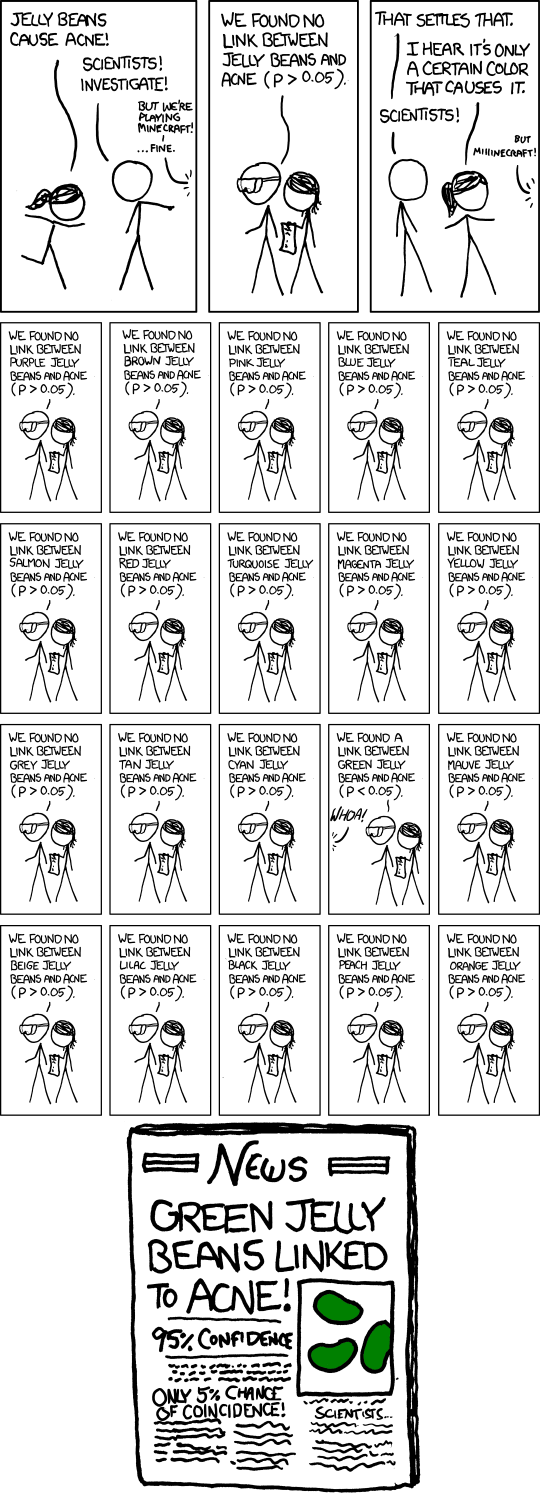
"Any claim coming from an observational study is most likely to be wrong"
This article from the journal "Significance"
Deming, data and observational studies
Author: S. Stanley Young, Alan Karr
Published: Aug 25, 2011 - From issue: Volume 8 Issue 3 (September 2011)
Doi: 10.1111/j.1740-9713.2011.00506.x
suggests a process control-based solution for improving the success rate of observational studies.
To better appreciate the problem of multiple testing, they suggest visiting Jery Dallal's simulation web page, which illustrates what happens when one carries out "100 Independent 0.05 Level Tests For An Effect Where None Is Present".
Deming, data and observational studies
Author: S. Stanley Young, Alan Karr
Published: Aug 25, 2011 - From issue: Volume 8 Issue 3 (September 2011)
Doi: 10.1111/j.1740-9713.2011.00506.x
suggests a process control-based solution for improving the success rate of observational studies.
To better appreciate the problem of multiple testing, they suggest visiting Jery Dallal's simulation web page, which illustrates what happens when one carries out "100 Independent 0.05 Level Tests For An Effect Where None Is Present".
Subscribe to:
Posts (Atom)